Choose the instruction file
Codex’s instruction discovery includes
AGENTS.override.md and configurable fallback filenames. These are Codex rules, not universal rules for every Kisuke harness. Refer to the official Codex instruction guide for details.
Claude Code’s direct AGENTS.md support depends on its version and configuration. A root CLAUDE.md remains the explicit setup described here. See Claude Code’s instruction documentation for current version-specific behavior.
Write useful project guidance
Start with facts and constraints that matter to this project. For a small static site, an instruction file could contain:Share guidance between Codex and Claude Code
If your repository already has anAGENTS.md, create a neighboring CLAUDE.md containing:
@ import syntax works in every harness. Pi’s loader chooses the first readable candidate in each folder, checking AGENTS.md before CLAUDE.md; it does not combine both files from the same folder through that discovery step.
Check the project and working folder
Place the file in the actual working copy used by the conversation. If the project runs on another device, edit the file there. If you are using a separate worktree, confirm that its files include the instructions you expect. Nested instructions have harness-specific scope and loading behavior. For shared project rules, start at the project root. Add narrower files only when you understand the active harness’s discovery rules and have checked the result.Verify before a larger task
- Save the instruction file in the project’s working folder.
- Open a new conversation for that project. Check the selected device, harness, and model before sending.
- Ask about a concrete instruction without copying its expected answer into your prompt.
- Compare the response with the saved file before requesting a larger task.
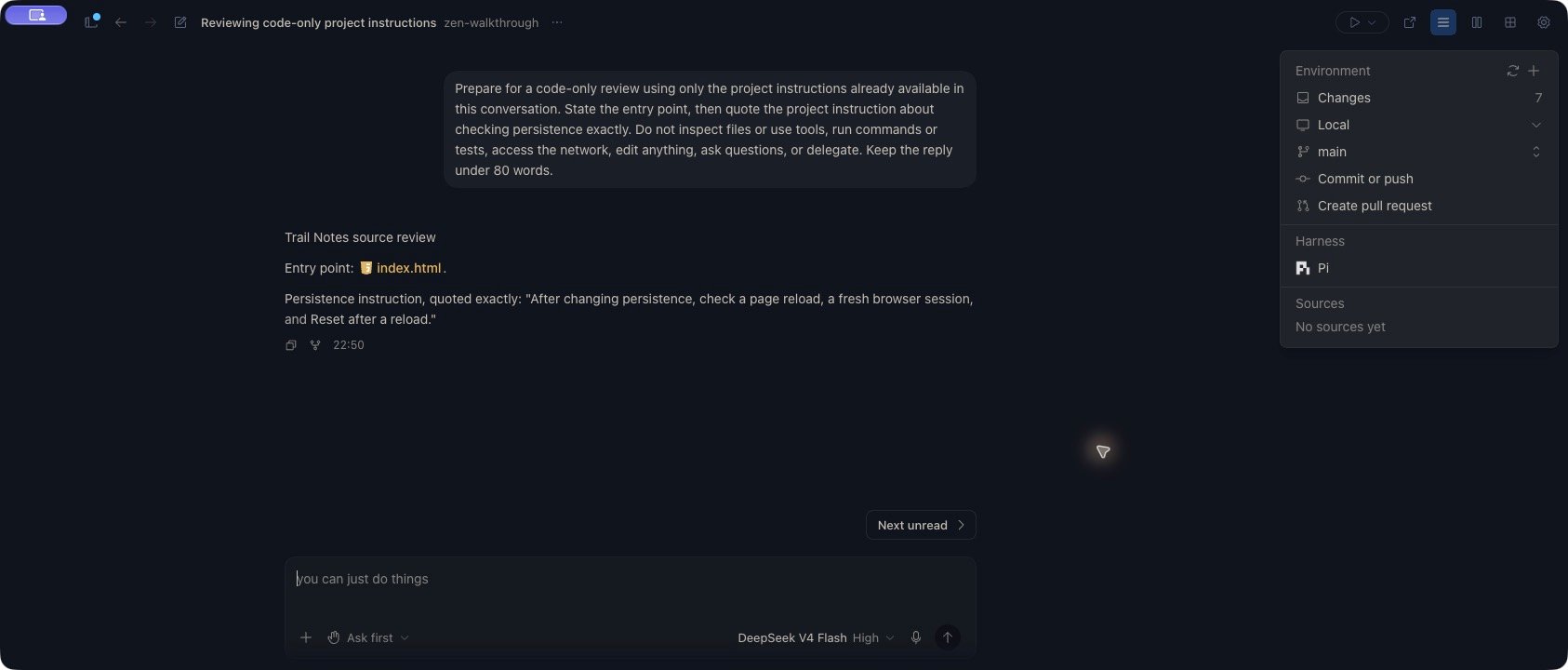
index.html, and quoted the persistence instruction, including Reset after a reload. The turn completed without tool calls. The expected text came from project context; it was not included in the request.
A new Pi conversation in Zen quotes the updated project instruction, including Reset after a reload.
View the instruction check in Zen
View the instruction check in Zen
Check again after editing instructions
Saving an instruction file does not establish that an active conversation has reloaded it. With Pi, an active session can retain earlier guidance: in the example above, the existing chat still quoted the original persistence instruction after the file changed. A new conversation quoted the updated version. After changing project instructions, save the file, start a new conversation for the same project and harness, and repeat a focused check. Compare the specific detail you changed. Do not use an earlier response as evidence that the current file has loaded, or assume another harness uses the same reload behavior.Troubleshoot missing guidance
If guidance is missing or unexpected, check:- The conversation’s project, device, working folder, and harness.
- The filename expected by that harness.
- Overrides or instruction files in parent folders and the harness’s user configuration.
- Whether you changed the file after starting the conversation.
- Whether the instructions conflict or depend on an unsupported import mechanism.