The selected response sets the conversation history to inherit. It does not restore files to how they looked when that response was written. Check the current Git changes before continuing.
Before you start
The response action is available in the shared desktop and web chat interface for Claude Code, Codex, and Pi conversations with saved history. It is not currently exposed in the mobile chat interface or for ACP harnesses. Open the conversation on its connected device and wait for its history to load. Choose a completed response. For a new worktree, the project must be a Git repository with at least one commit and no unresolved merge entries.Choose the response and destination
- Open the source conversation in Zen.
- Find the completed response you want to continue from. Hover over an older response, or focus its action controls, to reveal Continue from this response.
- Select Continue from this response.
- In Continue from this response?, choose New task or New worktree.
The continuation dialog offers a new chat in the same checkout or a new worktree. The response you selected determines the inherited history.
View the full Zen workspace
View the full Zen workspace
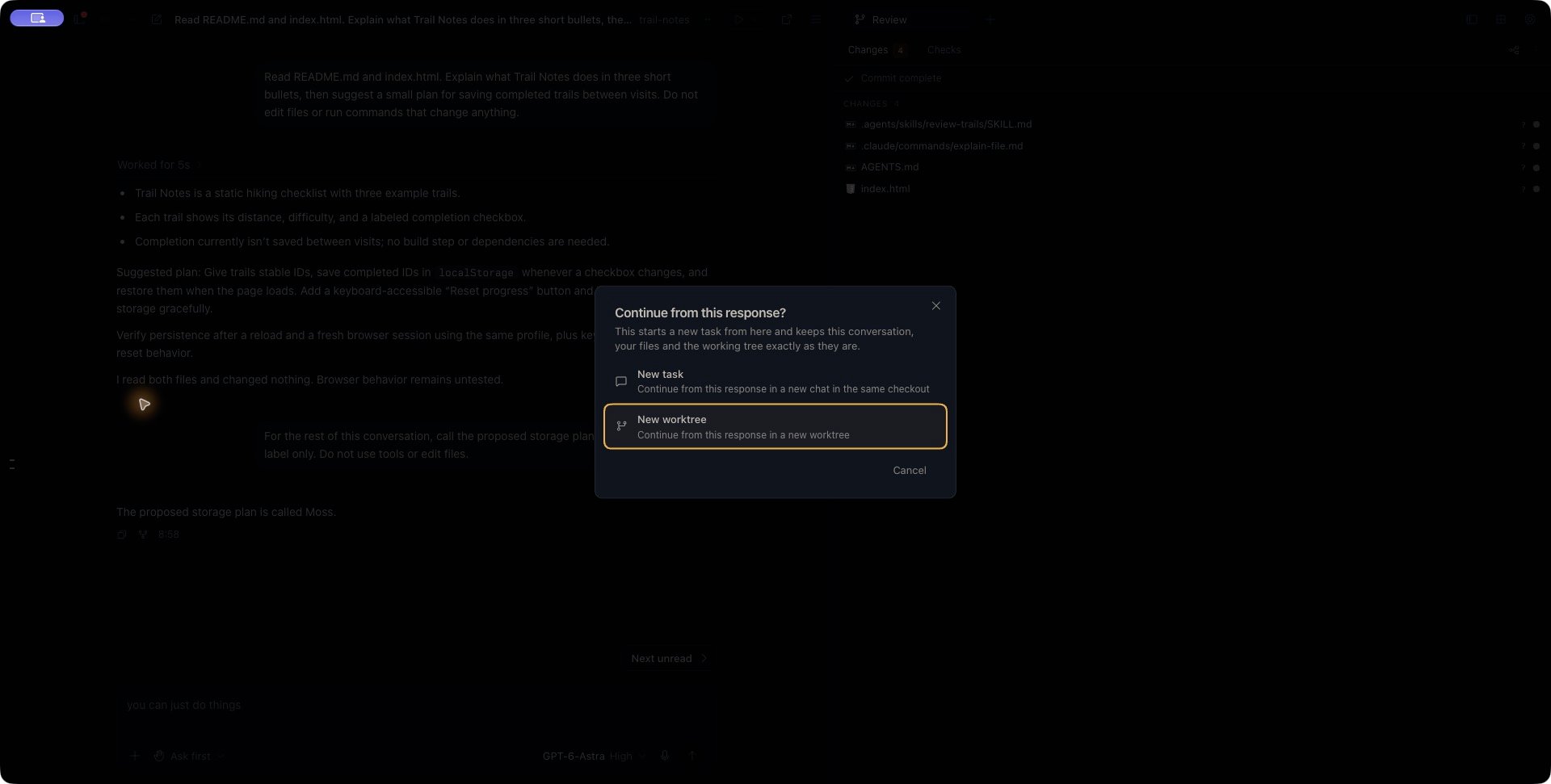
New task creates a separate chat; the label does not schedule recurring work. If both chats use the same checkout, coordinate edits between them to avoid conflicting changes.
What carries over
Conversation history
The new conversation inherits the history through the selected response. Messages after that response are excluded. Continuing from the latest completed response keeps the history available at that point. The new chat has its own identity. Renaming it does not rename the source conversation, and subsequent messages belong to the chat where you send them. For example, suppose you discuss a storage plan, then later name it “Moss.” Continuing from the response before that name was introduced inherits the plan but excludes the later naming message.Files in the same checkout
New task keeps the current working folder. It does not make a file copy, change branches, or undo changes made after the selected response. If you want the new conversation to understand changes that happened since that response, ask it to inspect the current files before acting.Files in a new worktree
New worktree creates a separate checkout from the source checkout’s current commit. It carries over staged changes, unstaged changes, and eligible untracked files while preserving their staging distinction. The source checkout’s files and index are not reset or stashed by this preparation. File copying uses the current Git state, so an older response can lead to a new worktree containing newer file changes. Ignored files are not copied automatically. The project’s configured files-to-copy rules can include additional files. Dependencies, local configuration, or generated output may therefore need setup in the destination. Kisuke uses the configured project workspaces directory when one is set; otherwise it uses its managed worktrees directory. It runs the project’s configured setup script before opening the new conversation. That script can change the destination files or perform other actions, so review the project’s setup before using it. Avoid changing branches, staging files, or editing the source while preparation runs. Kisuke rejects a changed commit or index during capture, but this is not a freeze of every external editor or process.Wait for the destination to open
During preparation, Kisuke shows an inherited-history preview with a disabled Continuation message field. Its placeholder is Message after setup completes. You may see Preparing worktree and running setup…, Preparing conversation…, or Opening conversation…. The preview is not an editable destination conversation. Wait until the new chat opens and its normal composer is available. Then check its project, checkout, model, and permissions before sending your first request. A useful first request is:Summarize the approach we discussed. Inspect the current files and explain anything that has changed since that discussion. Do not edit files yet.You can choose Back to conversation or navigate elsewhere while preparation is pending. This leaves the preview; it does not cancel worktree creation or a setup script already running.
Recover from a failed continuation
Use Retry on the pending continuation to check or reopen the same result. Repeatedly selecting New worktree from the source starts separate continuation requests and can leave multiple checkouts.
A recorded preparation failure remains the result of that request. After resolving its cause, inspect any retained checkout before deliberately starting another continuation.
Creating the destination history, preparing files, and opening a usable chat are separate steps. Treat the operation as ready for your next prompt only when the destination conversation has actually opened.