Choose when a follow-up takes effect
Open Settings → General → Follow-up behavior and choose:
Steering is a request to redirect work. With a supporting harness, Kisuke delivers it to the active run; other cases require interrupting and starting a new turn. It does not undo edits or commands that have already completed.
Not every submitted follow-up can take effect immediately. Existing queued work, a pending start, or settings that cannot yet be applied to the running harness can keep a message queued. If the agent is waiting for a permission decision or an answer, resolve that interaction first.
Use the send shortcut
Settings → General → Send messages with controls which key submits the composer. With Enter selected:- Enter submits normally.
- Shift+Enter inserts a new line.
- Cmd+Enter on macOS, or Ctrl+Enter on Windows and Linux, uses the opposite follow-up behavior for that message.
- The configured modifier plus Enter submits normally.
- Enter or Shift+Enter inserts a new line.
- There is no separate opposite-behavior shortcut with this setting.
Manage a queued message
Pending rows appear above the composer. Check their text and order before requesting delivery. For messages still retained in the visible queue, use these controls:- Steer, or Interrupt & steer where shown, requests delivery of that selected message now. The runtime determines how it can be delivered.
- Delete queued message removes a pending instruction from the queue.
- Queued message actions → Edit brings the instruction back into the composer for changes.
- Drag the reorder handle to change the order. With the handle focused, use the Up and Down arrow keys to move an entry.
Edit a pending instruction
- Open Queued message actions → Edit on the intended row.
- Wait for Editing queued message above the composer. The claimed row leaves the visible queue while its text and attachments move into the editor.
- Make your changes, then submit once. Wait for the edit notice to clear and inspect the revised queue row or the message in the conversation.
The reset instruction is open for editing. Two other instructions remain in the queue; the × beside Editing queued message cancels this edit.
View the full Zen workspace
View the full Zen workspace
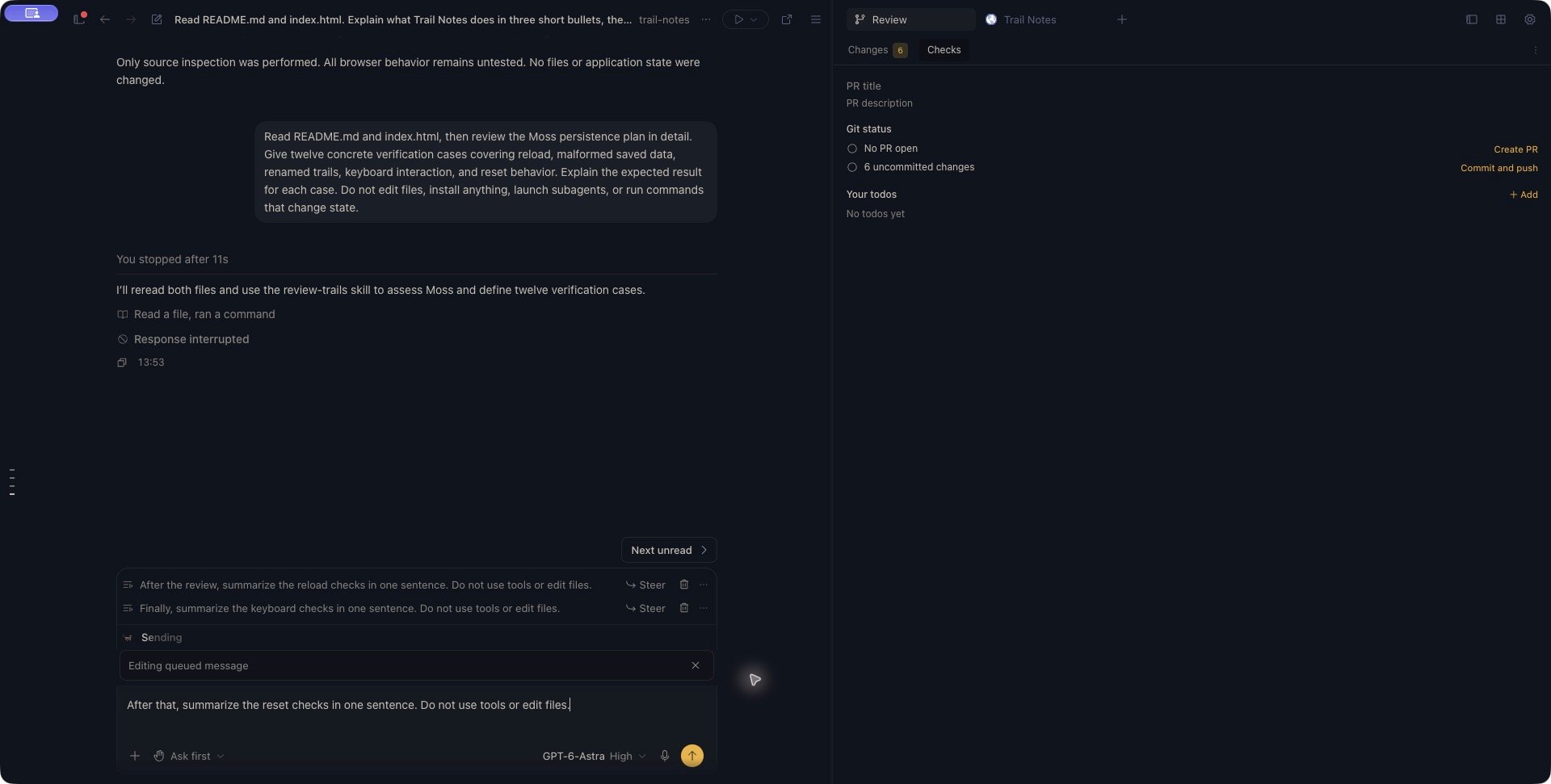
Cancelling an edit can make its message eligible to run
Cancel abandons your changes to the queued instruction; it does not delete that instruction. If the previous turn finished successfully while you were editing, restoring the original message can let the queue continue immediately. After Stop or a failed turn, the restored message remains retained until work is deliberately resumed. If you no longer want an instruction to run, use Delete queued message while it is pending. Stop active work first when you need time to review retained instructions. Check for a started response before assuming a removal can still prevent execution.Understand harness differences
Harnesses do not all receive follow-ups in the same way:- Codex and Pi can accept steering within an active turn. A queue request waits for a turn boundary.
- Claude Code can accept prioritized input in its active stream. Steer requests immediate redirection; Queue lets the current tool finish before the next model round. An accepted native input is no longer a pending row you can reorder or delete.
- Other harnesses and runtime states can require an interruption followed by a new turn. A rejected native steer can remain queued for later delivery.