> ## Documentation Index
> Fetch the complete documentation index at: https://docs.kisuke.dev/llms.txt
> Use this file to discover all available pages before exploring further.
# Project instructions
> Keep project conventions in the instruction file your harness reads, and verify them before asking for changes.
Project instruction files give an agent persistent context about a repository: how to run it, which checks matter, where important code lives, and what conventions to follow. Keep them in the project so the guidance travels with the code.
The **harness** determines how these files load. The model provider does not choose the instruction filename. For example, using a Google model does not by itself mean you are running the Gemini CLI harness. See [Models and harnesses](/models/overview).
## Choose the instruction file
| Harness | Starting point |
| - | - |
| Codex | Put `AGENTS.md` in the repository root. Codex also has its own global guidance, nested discovery, and override rules. |
| Claude Code | Put `CLAUDE.md` in the project root. Use a `CLAUDE.md` import when you want to share an existing `AGENTS.md`. |
| Pi | Put `AGENTS.md` in the working folder. Its context loader also checks ancestor folders and accepts `CLAUDE.md` when no earlier candidate is found in that folder. |
| Other harnesses | Check that harness's instruction-file support and installed version. Do not assume it follows another harness's rules. |
Codex's instruction discovery includes `AGENTS.override.md` and configurable fallback filenames. These are Codex rules, not universal rules for every Kisuke harness. Refer to the [official Codex instruction guide](https://learn.chatgpt.com/docs/agent-configuration/agents-md) for details.
Claude Code's direct `AGENTS.md` support depends on its version and configuration. A root `CLAUDE.md` remains the explicit setup described here. See [Claude Code's instruction documentation](https://code.claude.com/docs/en/memory) for current version-specific behavior.
## Write useful project guidance
Start with facts and constraints that matter to this project. For a small static site, an instruction file could contain:
```markdown theme={null}
# Trail Notes project guidance
- This is a static app. The entry point is index.html.
- For code-only reviews, begin with "Trail Notes source review".
- Keep the app usable with a keyboard and give each checkbox a clear label.
- Do not add a build system or dependencies without discussing the need.
- After changing persistence, check a page reload, a fresh browser session, and Reset after a reload.
- Report what you verified and what remains untested.
```
For a larger project, include the actual build and test commands, links to architecture documents, and boundaries that should not change. Check each command yourself before recommending it to the agent. Update the file when the workflow changes.
Keep instructions specific enough to verify. For example, “check that completed trails survive a reload” gives a clearer expected result than “test everything.” Put longer task procedures in [skills](/customization/skills) when they apply only to certain requests.
## Share guidance between Codex and Claude Code
If your repository already has an `AGENTS.md`, create a neighboring `CLAUDE.md` containing:
```markdown theme={null}
@AGENTS.md
```
This uses Claude Code's documented import syntax to read the shared file. Add any Claude-specific guidance below it. See the [Claude Code import guidance](https://code.claude.com/docs/en/memory#share-one-file-with-other-coding-tools).
Do not assume that the `@` import syntax works in every harness. Pi's loader chooses the first readable candidate in each folder, checking `AGENTS.md` before `CLAUDE.md`; it does not combine both files from the same folder through that discovery step.
## Check the project and working folder
Place the file in the actual working copy used by the conversation. If the project runs on another device, edit the file there. If you are using a separate worktree, confirm that its files include the instructions you expect.
Nested instructions have harness-specific scope and loading behavior. For shared project rules, start at the project root. Add narrower files only when you understand the active harness's discovery rules and have checked the result.
## Verify before a larger task
1. Save the instruction file in the project's working folder.
2. Open a **new conversation** for that project. Check the selected device, harness, and model before sending.
3. Ask about a concrete instruction without copying its expected answer into your prompt.
4. Compare the response with the saved file before requesting a larger task.
For the Trail Notes example above, use:
```text theme={null}
Prepare for a code-only review using only the project instructions
already available in this conversation. State the entry point, then
quote the project instruction about checking persistence exactly.
Do not inspect files or use tools, run commands or tests, access the
network, edit anything, ask questions, or delegate. Keep the reply
under 80 words.
```
In this example, Pi with DeepSeek V4 Flash began with **Trail Notes source review**, identified `index.html`, and quoted the persistence instruction, including **Reset after a reload**. The turn completed without tool calls. The expected text came from project context; it was not included in the request.
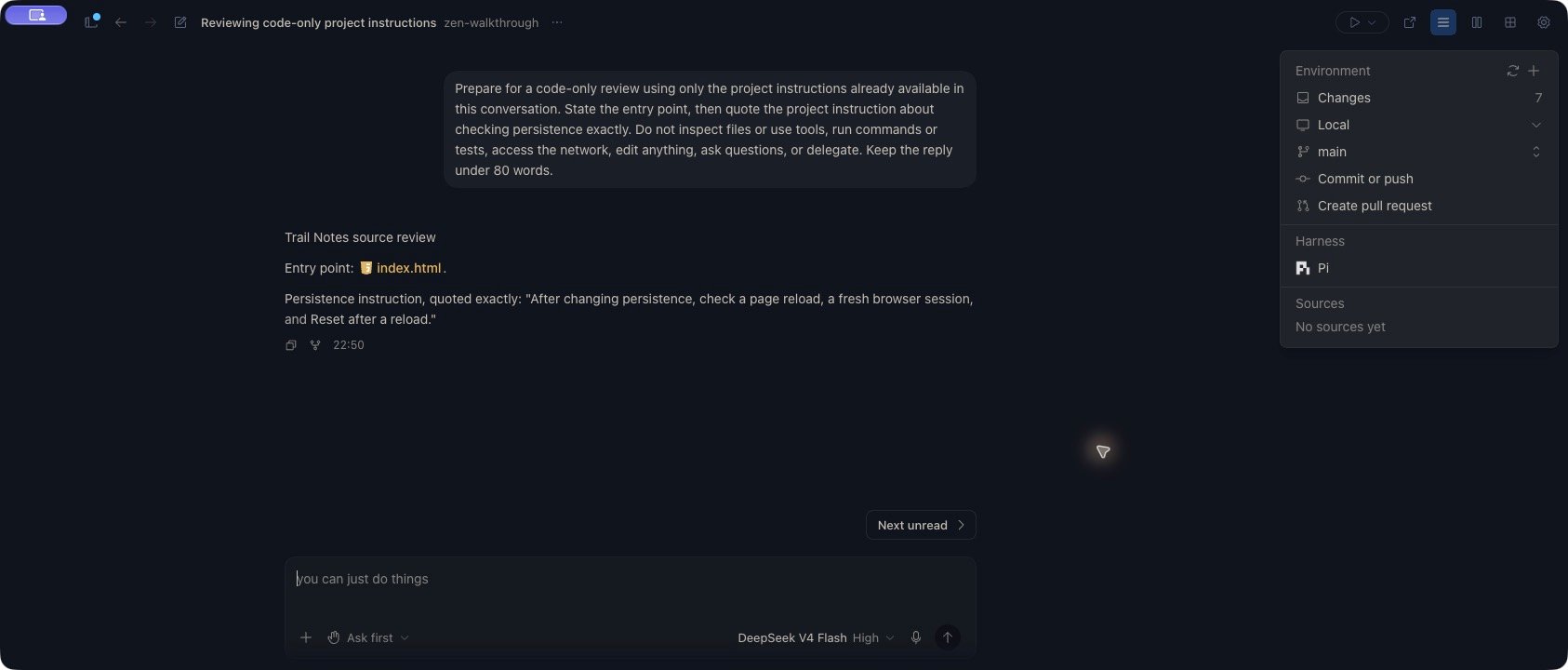 An accurate quotation is a useful check that the conversation has the expected guidance. It does not prove that every instruction will be followed during later work. Review the actual edits, tool results, and reported checks as the task proceeds.
## Check again after editing instructions
Saving an instruction file does not establish that an active conversation has reloaded it. With Pi, an active session can retain earlier guidance: in the example above, the existing chat still quoted the original persistence instruction after the file changed. A new conversation quoted the updated version.
After changing project instructions, save the file, start a new conversation for the same project and harness, and repeat a focused check. Compare the specific detail you changed. Do not use an earlier response as evidence that the current file has loaded, or assume another harness uses the same reload behavior.
## Troubleshoot missing guidance
If guidance is missing or unexpected, check:
* The conversation's project, device, working folder, and harness.
* The filename expected by that harness.
* Overrides or instruction files in parent folders and the harness's user configuration.
* Whether you changed the file after starting the conversation.
* Whether the instructions conflict or depend on an unsupported import mechanism.
Instruction files guide the model. Use [permissions](/conversations/permissions) for tool-approval behavior; a sentence in an instruction file is not an enforced access-control rule.
This documentation is built and hosted on [Mintlify](https://mintlify.com), a developer documentation platform.
An accurate quotation is a useful check that the conversation has the expected guidance. It does not prove that every instruction will be followed during later work. Review the actual edits, tool results, and reported checks as the task proceeds.
## Check again after editing instructions
Saving an instruction file does not establish that an active conversation has reloaded it. With Pi, an active session can retain earlier guidance: in the example above, the existing chat still quoted the original persistence instruction after the file changed. A new conversation quoted the updated version.
After changing project instructions, save the file, start a new conversation for the same project and harness, and repeat a focused check. Compare the specific detail you changed. Do not use an earlier response as evidence that the current file has loaded, or assume another harness uses the same reload behavior.
## Troubleshoot missing guidance
If guidance is missing or unexpected, check:
* The conversation's project, device, working folder, and harness.
* The filename expected by that harness.
* Overrides or instruction files in parent folders and the harness's user configuration.
* Whether you changed the file after starting the conversation.
* Whether the instructions conflict or depend on an unsupported import mechanism.
Instruction files guide the model. Use [permissions](/conversations/permissions) for tool-approval behavior; a sentence in an instruction file is not an enforced access-control rule.
This documentation is built and hosted on [Mintlify](https://mintlify.com), a developer documentation platform.